

Business software should help an organisation respond to change without making every new requirement a rebuild. That starts with understanding the work people need to complete, the risks they face and the outcomes worth measuring. A modern technology stack can support those goals, but it cannot define them.
The useful question is therefore practical: what should this product make easier today, and which decisions will keep tomorrow’s changes affordable? These seven steps help product owners, engineering teams and business leaders look beyond the code. The examples are illustrative rather than claims about measured customer results.
In this article
Table of Contents
1. Give business software a measurable purpose
Start with one difficult task. An order team might re-enter customer details in three systems, while a support team might struggle to find the current contract. Describe the user, the task, the present obstacle and the desired result before discussing frameworks. A clear problem statement gives designers and engineers something they can test.
Choose a small set of measures that reflect the work: completion rate, time to resolve an exception, correction frequency or the number of manual handoffs. Record the starting point. “Improve efficiency” is too broad to evaluate; “help staff complete an order without copying the delivery address” describes an observable change. Include a quality measure so faster processing does not hide more errors.
AWS connects operational practices with business outcomes in its Well-Architected guidance. Applied to business software, that means a design decision needs a reason linked to the service, rather than a fashionable tool. The exact measures and thresholds remain the organisation’s responsibility.
2. Choose adaptable architecture without unnecessary complexity
Adaptable software architecture separates responsibilities clearly. Pricing rules, customer identity and reporting should have understandable boundaries, even when they run in the same application. Keep dependencies visible and document the contracts between components. A small, well-structured application can be easier to change than many services connected through poorly understood interfaces.
Microservices introduce deployment, networking, monitoring and data-consistency work. They can help when teams need independent release schedules or workloads have very different scaling needs. They are not an automatic upgrade. A modular application may be a better first choice when the team is small and its product boundaries are still changing. Review that choice as evidence accumulates.
For business software integrations, define the data format, access rules, error behaviour and version policy of each API. Consider what happens when a dependency becomes unavailable or returns the same event twice. An integration that works in a demonstration still needs retries, duplicate handling and a clear route for investigating failed transactions.
Technology choices also have a lifespan. Our guide to post-quantum cryptography readiness examines how organisations can prepare for changes in encryption. The wider lesson is to identify important dependencies early and make future replacements a manageable process.
3. Make data useful before adding predictive features
Business software often collects more information than its users can interpret. Begin with decisions, not dashboards. A purchasing manager might need to identify overdue approvals, while a customer service lead needs to see unresolved cases by cause. Define who will act on each measure and how often they need it.
Check the meaning and source of the underlying data. Does “completed” mean submitted, paid or delivered? Are cancelled transactions excluded consistently? Who owns corrections? A shared definition prevents teams from confidently presenting different answers to the same question. Show update times and known limitations where they affect a decision.
Predictive analytics needs additional care. Test a proposed forecast against a simple baseline and examples that were not used to build it. Examine different customer groups and operating conditions. If a forecast changes ordering or staffing, keep an accountable person involved and make the consequences reversible where possible. Better charts alone do not establish better decisions.
4. Automate a bounded task and keep human control
Useful automation removes repeated handling from a process people already understand. Begin with a low-risk task such as routing a request using explicit rules, preparing a draft summary or checking whether required fields are present. Specify its inputs, permitted actions and fallback before connecting it to live records.
AI in software development can assist with code suggestions, documentation or test ideas. Treat generated output as material to review. Check correctness, dependency choices, licence concerns, security and whether tests cover the intended behaviour. Do not place confidential source code or customer records into an unapproved service merely because it is convenient.
Within business software, a suggested action and an executed action should have different controls. An assistant may draft a refund explanation while a person authorises the refund. Record the action taken, the responsible account and the relevant version of the rules or model. Provide a safe handoff when the system lacks evidence or encounters an unexpected case.
5. Build security, reliability and recovery into delivery
Secure software development belongs in planning and maintenance as well as coding. Identify sensitive information, likely misuse and the consequences of losing access. Limit permissions to the work each role needs. Protect credentials, review dependencies and establish who will assess and fix reported vulnerabilities. These are operating responsibilities with named owners.
The NIST Secure Software Development Framework provides a reference for incorporating security practices into the development lifecycle. It does not promise vulnerability-free products. A team should select and implement practices appropriate to its risks, then retain evidence that those practices work.
For reliable business software, test failure behaviour as deliberately as successful transactions. Can a user retry without creating a duplicate payment? Does a timed-out request leave an understandable status? Can the team restore a backup and reconcile work performed during an interruption? A recovery procedure is useful only when people can follow it under realistic conditions.
Define service expectations with the people who depend on the product. A reporting tool refreshed daily has different needs from a checkout service. Monitor response times, errors and critical task completion against those expectations. Set alerts that lead to a specific action, and review noisy alerts instead of treating notification volume as evidence of control.
6. Make the everyday experience clear and accessible
User-centred design begins with observing real work. Include experienced staff, new starters and people using assistive technology. Watch where users hesitate, invent workarounds or abandon a task. Ask them to complete realistic scenarios rather than simply asking whether they like the interface. Record findings before choosing changes.
Business software should use familiar labels, clear instructions and understandable error messages. Preserve entered information after a validation error. Explain which field needs attention and how to fix it. Allow keyboard operation and visible focus. Test zoom, small screens and long names or translated text, because ideal sample data rarely reflects production use.
Accessibility work should continue through design, implementation and testing. Automated checks are helpful but cannot establish whether the full task is usable. The W3C accessibility evaluation overview explains the role of human evaluation alongside tools. Include these checks in acceptance criteria rather than postponing them until release.
7. Improve business software through small, observable changes
Release a narrow improvement, verify its effect and decide what to do next. A useful first delivery might remove one duplicated field from an approval journey, with monitoring that shows whether corrections decrease. Smaller changes are easier to understand and reverse, although every release still needs appropriate review and testing.
Keep a short decision record for important trade-offs: the problem, alternatives, choice, expected benefit and a condition for revisiting it. Track operational costs alongside development costs. A feature that saves minutes for users but creates hours of support work needs further attention. Include maintainability and staff learning in the product roadmap.
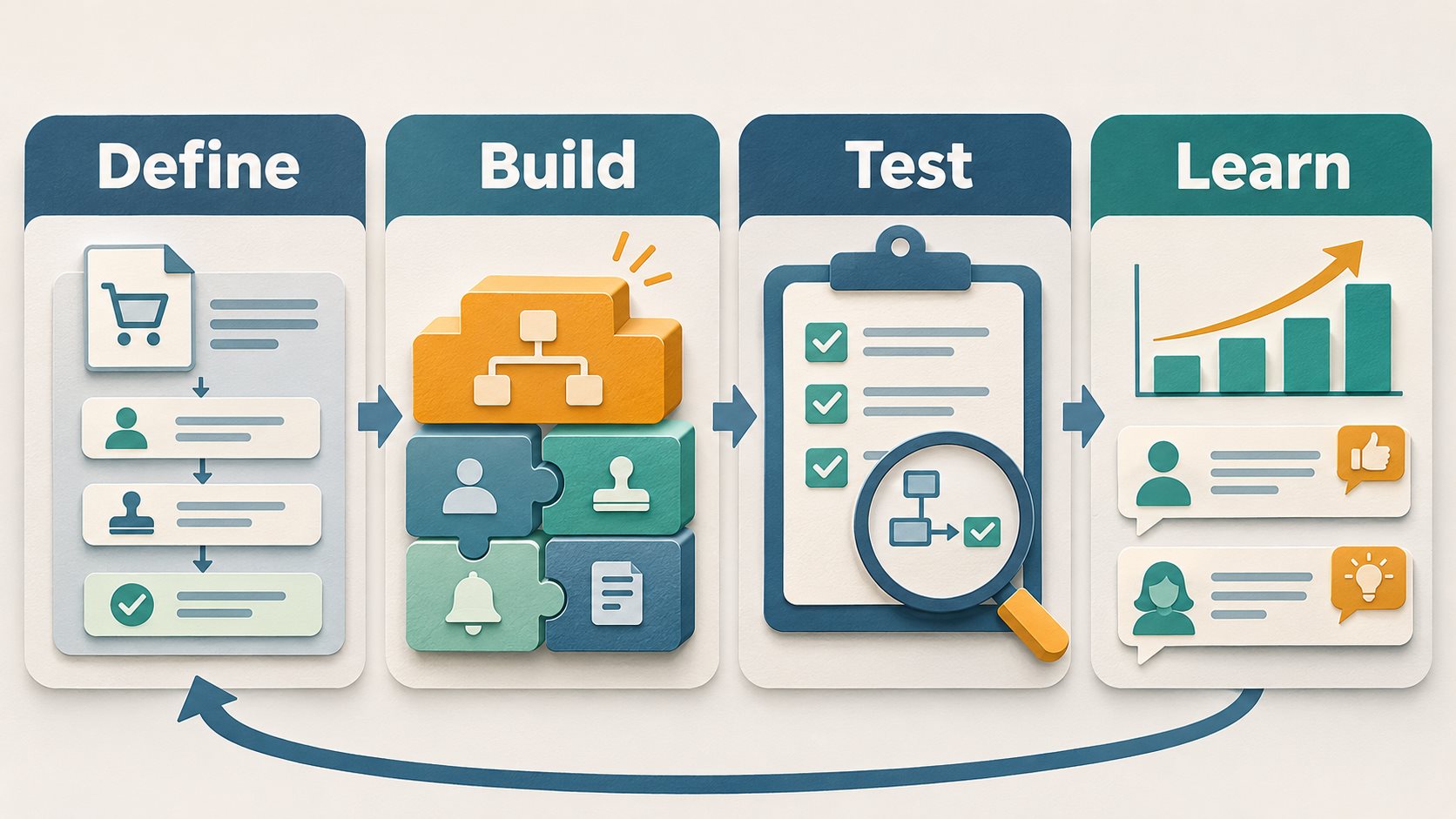
An initial improvement cycle can follow this sequence: establish the baseline; map the task and its dependencies; agree a safe experiment; test it with users; release with a fallback; review the outcome. The time required depends on the product and risk. This is a planning pattern, not a guaranteed delivery timetable.
Worked example: improving an approval journey
Consider a hypothetical distributor whose staff approve customer orders through email. An employee copies an order into a spreadsheet, checks a credit limit in another service and asks a manager for approval. Nobody is certain which copy is current. The proposed business software project begins with that narrow journey, rather than a plan to replace every system.
The team observes several real tasks with permission and suitable handling of customer information. It records where information is copied, where people wait and which exceptions require judgement. It then asks staff to distinguish a genuinely necessary approval from an inherited habit. Automating an unnecessary step would preserve the problem while making it harder to question.
The first version creates a single request record with a unique identifier. It obtains the credit status through an agreed interface and shows when that status was retrieved. A manager can approve, return the request with a reason or escalate it. The product records each action and prevents a retry from creating another order. These are proposed requirements, not evidence of an implemented customer system.
The team also defines boundaries. The business software does not change credit policy, authorise an unapproved payment or silently overwrite a customer record. If the credit service is unavailable, it displays a clear pending state and follows an agreed escalation route. A person can see what happened and who owns the next action.
Before release, staff try normal and exceptional cases. An approval is withdrawn, a request is submitted twice, a manager is absent and a dependency responds slowly. Users test the same tasks with a keyboard and enlarged text. Findings become concrete corrections, such as a missing return reason or an ambiguous status, rather than a general request to “improve usability.”
After release, the team compares completion, correction and support measures with its baseline. It checks whether the change has moved work onto another team. If staff still keep an unofficial spreadsheet, that behaviour is evidence to investigate. The business software may lack a necessary view, or the written process may conflict with the system.
What to include in a production readiness review
Agree which evidence is needed before business software is ready for its intended use. A low-risk internal lookup tool and an application that authorises transactions should not share an unquestioned checklist. Reviewers need to understand the impact of failure and the controls that address it. The following questions help make that review specific.
Can the team trace an important transaction? Follow a request from its origin to the result, including external calls and queued work. Keep useful identifiers without collecting unnecessary sensitive content. Staff should be able to investigate an error using authorised records rather than asking several users to reconstruct what happened from memory.
Can business software handle repeated or interrupted work? Test retries, duplicate events and a connection lost immediately after submission. Explain whether the action completed, failed or remains pending. Where uncertainty cannot be removed immediately, provide a safe investigation route. A vague “try again” message can be dangerous when the first action may already have succeeded.
Can permissions be reviewed and revoked? Identify how people join, change roles and leave. Check service accounts as well as human accounts. Administrative access should be limited and reviewable. A project is not ready simply because its initial users can sign in; access must remain appropriate throughout operation.
Can the team recover its business software and records? Restore a backup in a suitable test environment, verify that important records are present and measure what the procedure actually requires. Record dependencies such as keys, configurations and supplier access. A backup file without a tested restoration route is incomplete recovery evidence.
Does support know what to do? Provide a business software operating guide with common symptoms, investigation steps, escalation contacts and conditions for pausing the service. Make it available through a route that remains useful during an outage. Practise a handover so the application does not depend on one developer’s memory.
A decision record that stays useful
A short architecture decision record makes business software easier to maintain when people and priorities change. Describe the problem and constraints first, then the alternatives considered. Explain why the selected option fits the current team and workload. Include consequences that the team accepts, such as additional monitoring or a limitation on independent releases.
Add a review trigger. For example, a business software integration might be reconsidered when its supplier changes an interface or its processing delay exceeds an agreed requirement. A trigger gives future teams a reason to revisit the choice. It is more useful than an unsupported declaration that an architecture is “future-proof.”
Separate evidence from assumption in the business software decision record. A load test may establish performance under stated conditions; it does not establish every possible production behaviour. A user interview reveals the experience of that participant; it does not represent all customers. Naming those limits makes the next investigation easier and reduces false confidence.
Keep improvement costs visible
Business software has costs beyond the original build. Include hosting, supplier charges, support, dependency maintenance, security work, accessibility testing and staff training when comparing options. A low purchase price may still lead to a difficult operating model. An expensive platform may be unnecessary for a narrow task that simpler software can support.
Review business software costs against useful outcomes rather than treating every increase as a failure. Additional resilience may be justified for a critical workflow, while an elaborate reporting feature may provide little value. Make the trade-off explicit, assign an owner and check whether the expected benefit appears after delivery. This keeps technology investment connected to the work it is meant to improve.
Questions teams should answer before approval
Should every growing company use microservices? No. Choose an architecture based on team capacity, product boundaries, operational requirements and demonstrated scaling needs. Revisit the decision when those conditions change.
Does adding AI make business software more valuable? Only when the capability improves a defined task at an acceptable level of cost and risk. Compare it with a simpler approach, test representative cases and keep accountable ownership of consequential actions.
What should leaders review after launch? Review task outcomes, error patterns, reliability, accessibility findings, support demand and operating cost. Read these measures together; speed alone can conceal a poor experience.
The takeaway
Business software creates lasting value when its purpose, architecture and operating practices support the people doing the work. Start with an observable problem, choose manageable technical boundaries and make security, accessibility and recovery part of delivery. Then use evidence from real use to decide what deserves the next investment.
The goal is not to predict every future requirement. It is to make the next sensible change easier to evaluate, deliver and maintain.